


Emails - Difference between Global Opt-Out Link and the List-Unsubscribe Setting

  • July 24, 2026
  • 1 reply
  • 14 views

AudreyGlatz
Champion

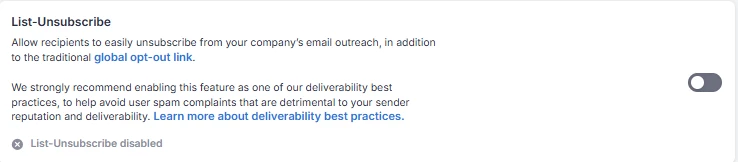
I am a new Salesloft admin and I am trying to understand the difference between e-mail Global Opt-Out Links and the List-Unsubscribe Setting (screenshot below).

When it mentions “in addition to golbal opt-out link” what does that look like in practice? Do emails have two unsubscribe options?

 

1 reply

SheenaJohnson
Discussions Moderator
Forum|alt.badge.img+1
  • Discussions Moderator
  • July 28, 2026

Hi Audrey -- Welcome to the Salesloft Admin club!

To answer your question directly: Yes, for certain email clients (like Gmail and Yahoo), recipients may see two distinct unsubscribe options.

While having two options might sound repetitive at first glance, they actually serve different technical purposes and work together to protect your domain health:

1. Header Unsubscribe (List-Unsubscribe Setting)

  • Where it appears: At the very top of the email, right next to the sender's name and email address in supported clients like Gmail or Yahoo.

  • How it works: It uses an industry-standard email header mechanism (List-Unsubscribe). When a user clicks it, the email client sends a one-click request directly back to Salesloft to opt the recipient out.

  • Why it matters: Email providers (especially Google and Yahoo with their recent deliverability guidelines) heavily favor senders who include header unsubscribes. It gives users a safe, reliable way to opt out without hitting the "Report Spam" button—which is crucial for keeping your domain reputation high.

2. Body/Footer Opt-Out Link (Global Opt-Out Tag)

  • Where it appears: Inside the actual body or signature/footer of your email (e.g., {{opt_out_link}}).

  • How it works: When a prospect clicks this hyperlink, they are directed to a Salesloft landing page confirming their opt-out preference.

  • Why it matters: This link appears in every email client regardless of whether the provider supports header unsubscribes (like desktop Outlook or custom enterprise mail servers).

What it looks like in practice

If a Gmail user opens an email sent from your team:

  1. They will see a small "Unsubscribe" link in the top header bar (provided by the List-Unsubscribe setting).

  2. If they scroll down to the bottom, they will see your custom opt-out link in the email footer.

Either way, if a prospect clicks either option, Salesloft instantly marks that person as Do Not Contact (DNC) / Opted Out across your team so they won't receive future cadence emails.

Hope this clears up the distinction! Let us know if you need help verifying your team's default opt-out settings or cadence templates. We also have weekly customer office hours, if you’d like to chat through this live! You can register here :)